What is a Dashboard? Who uses a Dashboard?
The Dealer Dashboard is a one-stop-shop for information regarding all orders connected to a Dealer. Team Dealers are strongly suggested to manage their dealer dashboard in order to best understand where each order is in the production process. The account dashboard shows you what actions are required to continue to process your ORGANIZATION’S order.
The Dealer Dashboard can only be viewed by those who hold ACCOUNT-level login information. Dealers may create an order from the dashboard by clicking CREATE ORDER.
Here is more information about your dashboard:
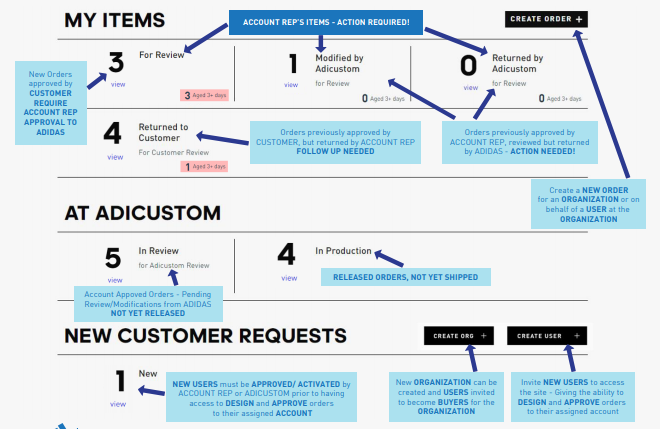
MY ITEMS: These are all the actions required by the ACCOUNT rep in order to move your order along.
- Orders in need of initial review by Dealer
- Orders modified by adiCustom returned to Dealer for review
- Orders returned by adiCustom for a particular reason requiring action by Dealer
- Orders returned by Dealer to School
AT ADICUSTOM: This section shows the ACCOUNT rep where their order is in the process once submitted to adiCustom.
NEW CUSTOMER REQUESTS: This section shows any pending requests of new users to be approved to begin creating their designs. You may also add new ORGANIZATIONS or invite new users.
About Dealer Notifications
Throughout the designing and ordering process, Dealers will receive emails with notifications regarding their orders. There are two types of email notifications that a dealer will get throughout the process: 1 ) Notification emails that action is required or 2) Confirmation emails that the order is received and when the order is approved which require no action. These emails provide you a direct link either into your order to handle the required action or to your Dealer Dashboard.
*Please make sure that you have info@adicustom.com and support@adicustom.com cleared to come into your inbox.
Comments
0 comments
Article is closed for comments.